Ford DiagNow
- 4.1
- Rating
- 100.00K
- Installs
- Free
- Price

 Analysis by App-foxy
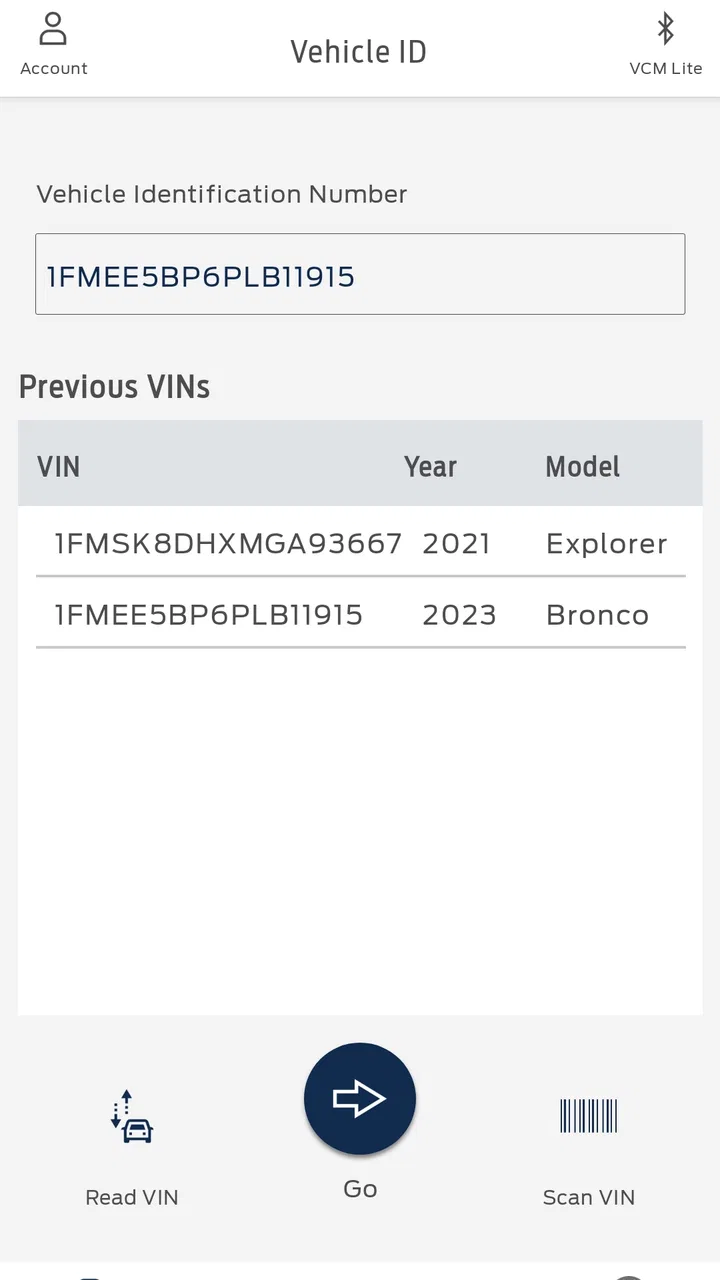
Ford DiagNow is a free Android app from Ford Motor Co. that focuses on one practical job: helping with Ford vehicle diagnostics. I see it as a specialist tool rather than a general driving companion. Its value depends less on entertainment or daily convenience and more on whether you need a clearer starting point when a Ford vehicle develops a fault.
The app sits in the Auto & Vehicles category and is available to everyone. It runs on Android 5.0 or later, which makes it accessible on many older phones as well as newer devices. The current version is 7.4.52, and its presence on more than 100 thousand devices suggests that it has found an audience among people who want a Ford-focused diagnostic option without paying for the app itself.
What caught my attention is the narrow purpose. Many vehicle apps try to combine navigation, fuel tracking, maintenance reminders, roadside help and remote controls. Ford DiagNow takes a different route. It is built around diagnostics, so the useful question is not whether it replaces every other car app, but whether it helps me understand a vehicle problem more efficiently than guessing from a warning light.
You May Also Like

 Google Keep - Notes and lists
Google Keep’s Quiet Growth Shows the Appeal of Simpler Notes
As mobile work gets busier, Google Keep keeps winning a simple contest: capture a thought quickly, find it later, and get on with the day.

 Blood Strike: 2.5 Anniversary
Blood Strike’s Loadouts Turn Every Drop Into a Tactical Gamble
A close look at Blood Strike’s custom loadouts: how fast access to signature weapons reshapes its battle royale rhythm, rewards preparation, and narrows the gap between fights.

 Pandora - Music & Podcasts
Pandora’s Music Is Easy to Start, but Harder to Recover
Pandora’s strength is its low-effort path from a seed to a station. Its weak spot is how much confidence it asks you to place in connection, setup, and quiet recovery.

 8 Ball Pool
 Is Built on Rivalries, Rematches, and Routine
A close look at the rivalries, rematches, shared routines, and unanswered safety questions that turn a quick pool match into a persistent mobile community.

 Samsung Music
’s Quiet Strength Is Playing What You Already Own
Its reach comes less from spectacle than from dependable access to a personal library. That simplicity is both the app’s strongest retention engine and its ceiling.

 AccuWeather: Weather Radar
AccuWeather Review: A Quick, Clear Forecast for Everyday Decisions
For everyday plans, the best forecast is the one you can understand quickly. AccuWeather makes rain timing, radar, and local conditions easy to act on, with a few trade-offs.
More From Our News Desk



Ford DiagNow’s diagnostic focus
I find the app’s diagnostic focus most useful when it helps turn a vague warning into a clearer next step, rather than promising a repair from a phone. In this section, I’ll look at how to prepare for a check and keep its result in context; that practical approach matters even more when the connection or the situation is less than ideal.
Turning a warning into a more useful starting point
The main capability is Ford vehicle diagnostics. In everyday terms, that means the app is intended to help investigate vehicle faults instead of leaving the driver with only a dashboard symbol and a vague sense that something is wrong. That distinction matters because a warning light rarely tells me whether I should stop immediately, arrange a workshop visit, or simply monitor the situation.
I would not treat a diagnostic result as a complete repair instruction. A code or fault indication can point toward an area that needs attention, but it does not automatically prove which component has failed. Wiring, sensors, connectors and related systems can create similar symptoms. The strongest use of this app is therefore better first-stage information before deciding what to do next, not replacing a qualified technician.
That makes the app especially relevant for Ford owners who prefer to understand a problem before calling a garage. It can help frame a more precise conversation: instead of saying that the car “feels strange,” I can describe the warning behavior and the diagnostic information I found. Even when a professional still needs to inspect the vehicle, that preparation can make the appointment less confusing.
The Ford connection is also important. A generic diagnostic app may support many makes, but broad coverage can come with a less focused experience. Ford DiagNow is aimed specifically at Ford vehicles, so its appeal is strongest when the car, van or other vehicle in question belongs to that ecosystem. If I regularly work on several unrelated brands, a broader tool may be more practical overall.
What the app does not change about diagnosis
Diagnostics are useful only when interpreted in context. A warning appearing after a cold start, a rough idle, reduced performance or an unusual sound can all change the meaning of the information shown by a tool. I would record what the vehicle was doing at the time, rather than looking at a result in isolation.
This is one of the less obvious lessons of using a focused diagnostic app: the quality of the notes around a fault can matter almost as much as the fault itself. Before clearing anything or restarting repeatedly, I would note the warning lights, the driving conditions and whether the problem disappeared. That creates a more useful record for a mechanic and reduces the risk of forgetting the original symptoms.
I would also avoid using any diagnostic reading as permission to continue driving when the vehicle feels unsafe. A serious braking, steering, overheating or engine problem deserves caution regardless of what an app displays. Ford DiagNow can support a decision, but it cannot inspect every mechanical condition from a phone.
Preparing for a useful session
Before opening the app, I would make sure the phone has enough battery and that I am parked somewhere safe. Diagnostic work is a poor task to perform while moving, and a quiet location makes it easier to read messages and think through the result. I would also have the vehicle identification details and the exact warning symptoms ready, because focused tools are more useful when the starting information is accurate.
A good workflow is simple. First, describe or observe the problem without trying to fix it. Next, run the diagnostic process as intended. Then, save or write down the result before taking action. Finally, compare the result with the vehicle’s behavior and decide whether the next step is monitoring, basic checking or professional service. This prevents the common mistake of seeing a code, clearing it immediately and losing the evidence that could have helped.
That workflow is a concrete advantage over casually searching the web for a dashboard icon. Online searches often produce long lists of possible causes, many of which are unrelated to the exact Ford vehicle. A focused diagnostic session can narrow the conversation, although it still requires sensible interpretation.
How it fits beside ordinary alternatives
The usual alternatives fall into three groups: visiting a workshop immediately, buying a separate diagnostic device, or using a general-purpose vehicle app. Ford DiagNow is most attractive when I want a Ford-specific starting point without making a purchase just to investigate a warning.
A workshop remains the better option when the vehicle is unsafe, the problem is persistent or the repair requires physical testing. A separate diagnostic device may be preferable for someone who works on cars frequently and wants a dedicated piece of equipment. A general app can make more sense for a household with several brands. The advantage here is focus, not universal coverage.
There is also a difference between convenience and certainty. An app can be easier to carry than a toolbox and less intimidating than technical equipment, but ease of access should not be confused with professional-level diagnosis. I consider Ford DiagNow a bridge between noticing a problem and seeking the right help.
A realistic roadside-to-garage scenario
Imagine I start the Ford before work and notice a warning light that was not present the previous evening. The car still starts, but the engine feels slightly different. Rather than repeatedly switching the ignition on and off or searching random forum posts, I park safely and use the app to investigate the vehicle’s diagnostic information.
If the result points toward a system that needs attention, I can record it alongside the symptoms: when the light appeared, whether the car lost power, and whether the warning stayed on. If the vehicle feels unsafe, I stop there and arrange assistance. If it remains driveable, I can contact a workshop with a clearer explanation and ask whether the car should be brought in immediately.
The benefit in this scenario is not that the app magically repairs anything. The benefit is reduced uncertainty. I have a more organized account of what happened, and I am less likely to make a decision based only on fear or guesswork. That is a modest capability, but it is genuinely useful when a warning appears at an inconvenient time.
Where the experience may feel limited
The narrow purpose can also be a limitation. Someone looking for route planning, fuel prices, service reminders or remote vehicle controls will not find a complete replacement for those kinds of tools here. I would not install it expecting a full ownership dashboard. Its usefulness begins when diagnostics are the specific problem to solve.
Another point of friction is the learning curve around diagnostic language. Even a clear result may contain terms that are unfamiliar to a new driver. The app can help identify an issue, but I may still need a trusted mechanic or reliable technical reference to understand the consequences. That is not a failure of the app so much as a reality of vehicle troubleshooting.
Phone-based diagnosis can also be affected by practical setup issues. I would not assume that every Ford model, every phone arrangement or every vehicle condition will produce the same experience. Before relying on it for a long trip, I would test the process while the vehicle is functioning normally and keep the app updated. That gives me a better idea of how it fits my own car before an urgent situation occurs.
Because the app is free, the financial barrier is low, but “free” does not remove the cost of a wrong decision. Clearing a warning without understanding it, continuing to drive through a serious symptom or replacing an expensive part based on a single indication can cost far more than a professional inspection. I would use the app to improve judgment, not to justify shortcuts.
Small habits that make the tool more valuable
My first practical tip is to create a simple vehicle log outside the app. Write down the date, warning behavior, driving conditions and any changes after restarting. This turns one diagnostic check into a useful history. A mechanic can often do more with a sequence of observations than with one isolated code.
My second tip is to separate “the warning disappeared” from “the problem is fixed.” Intermittent faults can temporarily vanish while the underlying issue remains. If the app helps me identify a recurring concern, I would keep the record and mention it even if the dashboard looks normal later.
My third tip is to use the result to ask better questions, not to argue with a technician. Instead of insisting that one part must be replaced, I would ask what tests can confirm the suspected area. This keeps the app in its strongest role: improving communication while leaving physical diagnosis and repair to the person equipped to perform them.
A fourth useful habit is deciding in advance what symptoms mean “stop.” If the car develops severe loss of power, smoke, overheating, unusual braking behavior or a steering problem, I would prioritize safety and assistance over completing an in-app check. Having that rule before a stressful moment makes it easier not to overestimate what the phone can do.
Who will get the most from it
I think Ford DiagNow is best for Ford owners who want a practical diagnostic reference on an Android phone. It suits people who are comfortable following a structured process, recording symptoms and accepting that an app result may lead to professional service rather than eliminate it.
It can also help a small independent workshop or hands-on owner as an initial screening tool, especially when the alternative is relying on memory or a generic search. The app’s value increases when the user already understands basic vehicle safety and knows when not to continue troubleshooting alone.
New drivers may appreciate the reassurance of having a Ford-focused tool, but they should use it alongside sensible guidance. A first-time owner who is uncomfortable interpreting vehicle warnings may be better served by contacting roadside assistance or a trusted garage directly. The app can organize information, but it does not remove the need for judgment.
I would skip it if I do not own or regularly use a Ford vehicle, if I need a multi-brand solution, or if I expect a complete maintenance and driving companion. I would also skip relying on it as my only answer for a serious mechanical problem. In those cases, a workshop, roadside service or a dedicated professional diagnostic setup is the better choice.
Availability and overall impression
The app is free, carries an Everyone content rating and has earned a 4.4 average from more than 700 ratings, with over 100 reviews contributing to the store feedback. Those figures suggest a generally positive reception, but I would still judge it by the specific diagnostic need rather than by popularity alone.
Ford Motor Co. released it on February 24, 2022, and the current version is 7.4.52. The relatively accessible Android requirement is helpful for owners who do not use a new phone, while the ongoing version number indicates that the app is maintained as a current product rather than being treated as a one-time experiment.
My final view is that Ford DiagNow earns its place when I need a Ford-centered way to investigate a warning and prepare for the next decision. Its strongest effect is practical: it can replace vague guessing with a more organized diagnostic starting point. It does not replace a mechanic, a physical inspection or a general vehicle-management app, and expecting it to do so would lead to disappointment.
For the right user, that limited scope is actually the reason to install it. I would keep it on an Android phone used by a Ford owner who wants to understand symptoms, preserve useful information and communicate more clearly with a workshop. If your goal is safer, better-informed troubleshooting rather than an instant repair, Ford DiagNow is a sensible free tool to have available before a warning light becomes an emergency.
FAQs for Ford DiagNow
01What is Ford DiagNow and what features does it offer?
Ford DiagNow is a diagnostic app designed for Ford vehicle owners and technicians. It provides real-time access to vehicle health information, diagnostic trouble codes, and live data streams. Users can perform tests and reset certain vehicle components. It's a must-have tool for anyone looking to keep their Ford vehicle in optimal condition.
02Is Ford DiagNow compatible with all Ford vehicles?
Ford DiagNow supports a wide range of Ford vehicles, but compatibility may vary depending on the model and year. It’s essential to check the app’s compatibility list on the official website or app store to ensure it works with your specific vehicle before downloading.
03How user-friendly is the Ford DiagNow app for non-technical users?
Ford DiagNow is designed to be user-friendly, with an intuitive interface that guides users through the diagnostic process. While it offers advanced features for technicians, the app's layout and instructions make it accessible for non-technical users who want to monitor their vehicle’s health easily.
04Are there any costs associated with using Ford DiagNow?
Ford DiagNow may involve costs depending on the features you wish to access. While the app itself may be free to download, certain advanced diagnostic functions or premium services might require a subscription or one-time purchase. Check the app store for detailed pricing information.
05What devices are compatible with Ford DiagNow?
Ford DiagNow is available for both Android and iOS devices. However, to ensure optimal performance, it's recommended that users have the latest operating system updates installed. Additionally, a reliable internet connection is necessary for accessing certain features and updates.
Pros
- User-friendly interface for easy navigation.
- Quick diagnostics for immediate insights.
- Compatible with a wide range of Ford models.
- Regular updates enhance functionality.
- Secure data handling ensures privacy.
Cons
- Limited to Ford vehicles only.
- Requires a stable internet connection.
- Some features require in-app purchases.
- Occasional connectivity issues.
- User support can be slow at times.

Ford DiagNow
Gallery